Back to blogs
Blog
Writing in public
Longer posts — published here first, then cross-posted to Dev.to with a canonical URL back to this site.
Blog
Longer posts — published here first, then cross-posted to Dev.to with a canonical URL back to this site.
Back to blogs
Back to blogs
Postnextjs, node, email, smtp
Next.js 14 introduced a new feature: stable server actions. They are functions that run on the server...
Date published

odemailer with Brevo is an excellent combination for sending free emails (up to 300 per day) within...

Why You Might Still Pick Next.js Over TanStack Start From a TanStack Start...

Discriminated unions (also known as tagged unions) are a powerful TypeScript pattern that enables...
Next.js 14 introduced a new feature: stable server actions. They are functions that run on the server and handle form submissions and data mutations in Next.js applications.
They eliminate the need for separate API routes or complex type mapping. Server actions simplify the workflow, making your frontend code more concise and your forms more performant.
They also support progressive enhancement, meaning your forms and buttons work even without JavaScript. Server actions are a powerful tool for web development.

Now we'll just define an action that will take in the form data and send myself an email with NodeMailer based on what was submitted.
1"use server";23import {createTransport} from "nodemailer";45export interface ContactFormState {6 message: string;7 error: boolean;8 success:boolean;9 fieldValues: {10 sender_name: string;11 sender_email: string;12 sender_message: string;13 }14}15export async function sendEmailwithBrevoSmtpAction(prevState: ContactFormState, formData: FormData) {16 const mail_from = process.env.EMAIL_FROM17 const mail_to = process.env.EMAIL_FROM18 const brevo_key = process.env.BREVO_KEY19 if (!mail_from || !mail_to || !brevo_key) {20 return {21 message: "Ooops something went wrong on our side, please try again later",22 error: true,23 success: false,24 fieldValues: prevState?.fieldValues25 }26 }27 const rawFormData = {28 sender_name: formData.get("sender_name"),29 sender_contact: formData.get("sender_contact"),30 sender_message: formData.get("sender_message"),31 };3233 const transporter = createTransport({34 host: "smtp-relay.brevo.com",35 port: 587,36 auth: {37 user:mail_to,38 pass:brevo_key,39 },40 });4142 const mailOptions = {43 from:mail_from,44 to:mail_to,45 subject: `Someone left a sender_message on your site`,46 text: `hey there, ${rawFormData.sender_name} with email: ${rawFormData.sender_contact}47 has reached out to you on your portfolio site. \n48 ------------------------------------------------\n49 ${rawFormData.sender_message}50 `,51 };525354 async function asyncsendMail(){55 return new Promise<ContactFormState>((resolve,reject) =>{56 transporter.sendMail(mailOptions,57 function (error: any, info: any) {58 if (error) {5960 resolve(61 {62 message: "Something went wrong",63 error: true,64 success: false,65 fieldValues: prevState.fieldValues66 }67 )6869 } else {7071 resolve({72 message: "Successfully sent, Thank you!",73 error: false,74 success: true,75 fieldValues: {76 sender_name: "",77 sender_email: "",78 sender_message: "",79 }80 })818283 }84 });85 });86 }8788 return await asyncsendMail()899091}
Am using brevo SMTP , they have a nice free tier and great dashboard ,their SDK is not it hence why I with nodemailer instead
then we can call it in out component
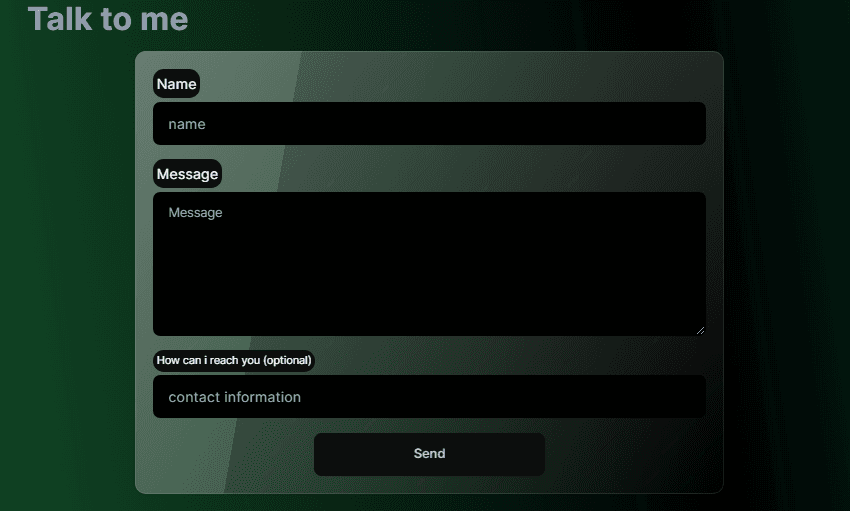
1"use client";2import { useFormState, useFormStatus } from "react-dom";3import { SectionHeader } from "../shared/SectionHeader";4import { sendEmailwithBrevoSmtpAction,ContactFormState } from "./utils/brevo-nodemailer";5import { testAction } from "./utils/test-action";6import { useEffect, useRef, useState } from "react";7import { Loader } from "lucide-react";8import { SubmitButton } from "./SubmitButton";91011interface ContactMeFormProps {1213}141516export function ContactMeForm({}:ContactMeFormProps){17 // @ts-expect-error18 const [formState, formAction] = useFormState<ContactFormState>(sendEmailwithBrevoSmtpAction, {19 message: "",20 error: false,21 success: false,22 fieldValues: {23 sender_name: "",24 sender_email: "",25 sender_message: "",26 },27 });28const [status,setStatus] = useState({29 error:formState.error,30 success:formState.success31})32const formRef= useRef<HTMLFormElement>(null)33useEffect(()=>{34if(formState?.success){35 formRef.current?.reset()36}37setStatus((prev) => {38 return {error:formState.error,success:formState.success};39});40const messageTimeout = setTimeout(()=>{4142 if(formState?.error){43 setStatus((prev)=>{44 return {...prev,error:false}45 })46 }47 if(formState?.success){48 setStatus((prev) => {49 return { ...prev, success: false };50 });51 }52},8000)53return ()=>{54 clearTimeout(messageTimeout)55}56 },[formState])57585960return (61 <div className="w-full h-full min-h-screen flex flex-col items-center justify-center rounded-lg animate-in fade-in zoom-in duration-500 ">62 <SectionHeader heading="Talk to me" id="contact" />63 <form64 id="contact-form"65 ref={formRef}66 action={formAction}67 className="flex flex-col justify-center items-center gap-4 w-[95%] md:w-[70%] lg:w-[60%] min-w-[60%] h-fit glass p-5 rounded-xl ">68 {status?.error && (69 <div70 className="bg-base-300 text-error border border-error p-271 text-balance rounded-xl animate-in fade-in zoom-in duration-700">72 {formState?.message}73 </div>74 )}75 {status?.success && (76 <div77 className="bg-base-300 text-success p-2 border border-success text-center text-balance78 rounded-xl animate-in fade-in zoom-in duration-700">79 {formState?.message}80 </div>81 )}8283 <div className="w-full flex flex-col gap-1">84 <label htmlFor="sender_name" className="bg-base-200 rounded-xl p-1 w-fit">85 Name86 </label>87 <input88 id="sender_name"89 type="text"90 placeholder="name"91 name="sender_name"92 className="input"93 />94 </div>9596 <div className="w-full flex flex-col gap-1">97 <label htmlFor="sender_message" className="bg-base-200 rounded-xl p-1 w-fit">98 Message99 </label>100 <textarea101 id="sender_message"102 name="sender_message"103 required104 className="textarea min-h-40"105 placeholder="Message"106 />107 </div>108109 <div className="w-full flex flex-col gap-1">110 <label htmlFor="sender_contact" className="text-xs bg-base-200 rounded-xl p-1 w-fit">111 How can i reach you (optional)112 </label>113 <input114 id="sender_contact"115 placeholder="contact information"116 type="text"117 name="sender_contct"118 className="input"119 />120 </div>121 <SubmitButton />122 </form>123 </div>124);125}126
and for the button
1import { Loader } from "lucide-react";2import { useFormStatus } from "react-dom";34interface SubmitButtonProps {56}78export function SubmitButton({}:SubmitButtonProps){9const { pending } = useFormStatus();10return (11 <button12 // onClick={(e) => e.preventDefault()}13 type="submit"14 className="btn btn-wide">15 Send {pending && <Loader className="animate-spin h-4 w-4" />}16 </button>17);18}19

Shoutout to daisyui for that cool glass effect
And that should give us a progressively enhanced form that will work wit JavaScript disabled and get better UX with JS turned on
This would have all been easier to do with libraries like react-hook-form , but over engineering actually adds value in the form of progressive enhancement.
At tis point , the only thing we haven't over engineered is the animations , we could do stuff with framer-motion , threejs or animejs , we could even go harder and do stuff with the WebGPU APIs . but we can leave it at that for now as it would require an unnecessary amount of client side JavaScript and probably annoy anyone viewing it but maybe I might try out Qwik which is better at this .
A minimal tailwind animations compromise is tailwindcss-animate , but it doesn't have fancy interaction observer or list staggering animation as all those require JavaScript and event listeners and I wish to retain components without "use client" .