I had a full stack chat app powered by graphql with react front end and express backend. It worked beautifully but issues arose when i tried to host backend with heroku , something about them only supporting a specific type of websockets chat app with graphql subscriptions client code init commit
One of the listed supported ones was socketio , so i tried it out for the front end we'll be using react with vite because create-react-app has some deprecated webpack related libraries that are causing vulnerability warnings
My objective with this was to make it as minimal as possible to make it easier to host , so no database will be used live priview of the chat app
to get started run,
and follow the instructions
dependancies are
1npm install axios react-icons socket.io-client
i used tailwindcss for this one feel free to skip and implement your own styles, adding tailwind to a react app
in oredr to get started we'll first need to mockup the server.
so exit the react folder and run
```js
npm init -y
js npm install -D typescript
1you can use your own custom tsconfig file or use this one that works for me
2
js { "compilerOptions": { "target": "es2017", "module": "commonjs", "lib": ["dom", "es6", "es2017", "esnext.asynciterable"], "skipLibCheck": true, "sourceMap": true, "outDir": "./dist", "moduleResolution": "node", "removeComments": true, "noImplicitAny": false, "strictNullChecks": true, "strictFunctionTypes": true, "noImplicitThis": true, "noUnusedLocals": true, "noUnusedParameters": true, "noImplicitReturns": true, "noFallthroughCasesInSwitch": true, "allowSyntheticDefaultImports": true, "esModuleInterop": true, "emitDecoratorMetadata": true, "experimentalDecorators": true, "resolveJsonModule": true, "baseUrl": "."
}, "include": [ "src/*/" ], "exclude": [ "node_modules" ]
}
1
2then add the scripts to your package.json 3
js "scripts": { "watch": "tsc -w", "start": "nodemon dist/index.js", "test": "echo \"Error: no test specified\" && exit 1" },
1create an src directory and add an index.ts file in it.
2
3then install
4
js npm install cors express body-parser nodemon socket.io
1
2then create a simple server in index.ts
3
js import express,{ Request,Response } from "express"; import { Server } from "socket.io"; import { createServer } from "http"; import { addUser, checkUserNameExists,removeUser} from './utils/usersutil'; import { makeTimeStamp } from './utils/utils';
// const express = require('express');
const cors = require('cors'); const bodyParser = require('body-parser')
const app = express();
const PORT = process.env.PORT||4000 const server = createServer(app); // const httpServer = createServer(app); var jsonParser = bodyParser.json() // create application/x-www-form-urlencoded parser // var urlencodedParser = bodyParser.urlencoded({ extended: false })
const io = new Server(server,{ cors: { origin: "http://localhost:3000", credentials: true, allowedHeaders: ["my-custom-header"],
} });
(async () => {
app.use(cors()) app.options('*', cors());
app.get('/', (req:Request, res:Response) => { res.send({ message: "We did it!" }) });
app.get('/me', (req:Request, res:Response) => { res.send({ message: "smoosh" }) });
app.post('/users',jsonParser,(req:Request, res:Response) => {
const user = req.body?.user.username // //console.log("looking for ===== ",user) const userExists = checkUserNameExists(user) //console.log("looking for ===== ",user, userExists) res.send({data:userExists}) });
io.on("connection", async(socket) => {
//console.log(Client ${socket.id} connected);
// Join a conversation const { room,user } = socket.handshake.query; const room_id = room as string const user_count = addUser({id:socket.id,name:user,room}) // //console.log("room id / user==== ",room_id,user,user_count) socket.join(room_id); io.in(room_id).emit('room_data', {room,users:user_count}); const join_room_message={message:${user} joined, time:makeTimeStamp(), user:"server" } io.in(room_id).emit('new_message_added', { user,newMessage:join_room_message});
socket.on('new_message', (newMessage) => { //console.log("new message ",newMessage,room_id) const user = newMessage.user //@ts-ignore io.in(room_id).emit('new_message_added', { user: user?.name,newMessage});
})
socket.on("disconnect", () => { //console.log("User Disconnected new user count ====", socket.id,user_count); removeUser(socket.id) io.in(room_id).emit('room_data', {room: room_id,users:user_count - 1 }); const join_room_message={message:${user} left, time:makeTimeStamp(), user:"server" } io.in(room_id).emit('new_message_added', { user,newMessage:join_room_message}); }); });
server.listen(PORT, () => { console.log(listening on http://localhost:${PORT}) });
})().catch(e=> console.log('error on server ====== ',e) )
1there's also a user helper functions file
2
3
js interface User{ id:string name:string room:string
} const users:User[] = [];
const userExists=(users:User[],name:string)=>{ let status = false
for(let i = 0;i<users.length;i++){ if(users[i].name===name){ status = true; break } } return status; }
//console.log("all users in list=== ",users)
export const addUser = ({id, name, room}) => { name = name?.trim().toLowerCase(); room = room?.trim().toLowerCase();
//console.log("user to add ==== ",name)
const existingUser = userExists(users,name) //console.log("existing user????====",existingUser) if(existingUser) { //console.log("existing user") return users.length; }else{ const user = {id,name,room}; //console.log("adding user === ",user) users.push(user); //console.log("all users === ",users) const count = getUsersInRoom(room).length return count }
}
const userExistsIndex=(users:User[],id:string)=>{ let status = -1
for(let i = 0;i<users.length;i++){ if(users[i].id === id){ status = i; break } } return status; }
export const checkUserNameExists=(name:string)=>{ let status = false
for(let i = 0;i<users.length;i++){ if(users[i].name === name){ status = true break } } return status; }
export const removeUser = (id:string) => { // const index = users.findIndex((user) => { // user.id === id // }); const index = userExistsIndex(users,id) //console.log(index) if(index !== -1) { //console.log("user ",users[index].name ,"disconected , removing them") return users.splice(index,1)[0]; }
}
export const getUser = (id:string) => users .find((user) => user.id === id);
export const getUsersInRoom = (room:string) => users.filter((user) => user.room === room);
export const userCount =()=>users.length
js export const makeTimeStamp=()=>{
const hour = new Date(Date.now()).getHours()
const min = new Date(Date.now()).getMinutes() const sec = new Date(Date.now()).getSeconds()
let mins= min+'' let secs=':'+sec if(min<10){ mins = '0'+ min }
if(sec<10){ secs = '0' + sec }
return hour+':'+ mins + secs }
1
2
3It's a regular node js express server that connects and listens for a socket connection then it adds the user to a temporary list and returns a room name and number of users in it ,
4
5there's a post /users rest endpoint which would normally be used to authenticate and add user to a database but in this case it’ll just check if the username provided is already in use which causes weird issues when two people use the same names in the same room.
6
7The socket io instance will also be listening for new messages emitted by the clients and broadcasting them to everyone in the room.
8
9finally it listens for disconnections in which case it removes the username from the temporary list and informs everyone in the room
10
11To watch for changes in the index.ts folder and compile it to dist/index.js and run the server .
12use the two commands below each in their own terminal instance
13
js npm run watch npm start
1
2and let's head back to the client,
3
4Remember we're trying to keepthis minimal So
5most of the stateful logic will be held in the front end .
6For starters we need to ensure the user has a username and room before they enter the chats components which is where we bring in reactcontext and localStorage
7
8my final folder structure looks like this
9
10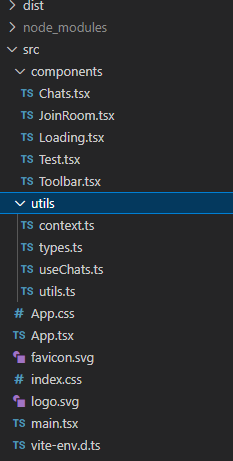
11the common types will look something like this
12
ts export type Chat ={ newMessage:{message: string; time: string,user:string }}; export interface User{username:string ; room:string} export interface Room{users:number ; room:string} export interface Message{ message: string; time: string; user: string; }
1
2
3inside context.ts we create the UserContext
js mport React from 'react'; import { User } from './../App';
const user_data = { user:{username:"",room:"general"}, updateUser:(user:User)=>{}}
const UserContext = React.createContext(user_data); export default UserContext;
1
2then we'll make a custom hook to handle the socketio client
3
js import { Room, User } from "./types" import { useRef,useState,useEffect } from 'react'; import socketIOClient,{ Socket } from 'socket.io-client';
const NEW_MESSAGE_ADDAED = "new_message_added"; const ROOM_DATA = "room_data";
const devUrl="http://localhost:4000"
const useChats=(user:User)=>{
const socketRef = useRef<Socket>(); const [messages, setMessages] = useState<any>([]); const [room, setRoom] = useState<Room>({users:0,room:""});
useEffect(() => { socketRef.current = socketIOClient(devUrl, { query: { room:user.room,user:user.username }, transports: ["websocket"], withCredentials: true, extraHeaders:{"my-custom-header": "abcd"}
})
socketRef.current?.on(NEW_MESSAGE_ADDAED, (msg:any) => { // //console.log("new message added==== ",msg) setMessages((prev: any) => [msg,...prev]); });
socketRef.current?.on(ROOM_DATA, (msg:any) => { //console.log("room data ==== ",msg) setRoom(msg)});
return () => {socketRef.current?.disconnect()}; }, [])
const sendMessage = (message:any) => { //console.log("sending message ..... === ",message) socketRef.current?.emit("new_message", message) };
return {room,messages,sendMessage} } export default useChats
1
2we store the socket instance in a useRef because we don't want it re-initializing on every re-render , then we put it in a useEffect to only initialize on component mount we return the new messages,room data , and a sendmessage function 3
4in order to keep this miniman i avoided routing and just did optional rendering because we'll only have two major components, we initially check if there's a user in the local storage and show the JoinRoom.tsx component if not 5
js import { JoinRoom } from './components/JoinRoom'; import React from 'react' import UserContext from "./utils/context"; import { Chats } from './components/Chats';
export interface User{username:string ; room:string}
let the_user:User const user_room= localStorage.getItem("user-room"); if(user_room) the_user = JSON.parse(user_room);
function App() {
const [user, setUser] = React.useState<User>(the_user); const updateUser = (new_user:User) => {setUser(new_user)}; const user_exists = user && user.username !==""
return (
<div className="scroll-bar flex flex-col justify-between h-screen w-screen ">
<UserContext.Provider value ={{user,updateUser}}> {user_exists?<Chats />:<JoinRoom/>}
</UserContext.Provider>
</div>
); }
export default App;
1for the custom tailwind classes add this to the index.css
2
3
css @tailwind base; @tailwind components; @tailwind utilities;
body { margin: 0; font-family: -apple-system, BlinkMacSystemFont, 'Segoe UI', 'Roboto', 'Oxygen', 'Ubuntu', 'Cantarell', 'Fira Sans', 'Droid Sans', 'Helvetica Neue', sans-serif; -webkit-font-smoothing: antialiased; -moz-osx-font-smoothing: grayscale; }
code { font-family: source-code-pro, Menlo, Monaco, Consolas, 'Courier New', monospace; }
.flex-center{ @apply flex justify-center items-center }
.flex-center-col{ @apply flex flex-col justify-center items-center } .scroll-bar{ @apply scrollbar-thin scrollbar-thumb-purple-900 scrollbar-track-gray-400 }
1
2the scrollbar class is a tailwind extension you can install and add to your tailwind config
3
js npm install -D tailwind-scrollbar
1
2then add it to your tailwind.config.js
3
js / @type {import('tailwindcss').Config} */ module.exports = { content: [ "./src//*.{js,jsx,ts,tsx}", ], theme: { extend: {}, }, plugins: [ require('tailwind-scrollbar'), ], }
jsx import React from 'react'
interface LoadingProps {
}
export const Loading: React.FC<LoadingProps> = ({}) => { return (
<div className='h-full w-full flex-center bg-slate-300 text-lg'>
loading ...
</div>
); }
1
2the JoinRoom.tsx which will be shown if no user found in local storage ,
js import React, {useContext, useState} from "react"; import UserContext from './../utils/context'; import axios from 'axios';
interface JoinRoomProps {
}
export const JoinRoom: React.FC<JoinRoomProps> = () => {
const [input, setInput] = useState({ username: "", room: "general" }); const [error, setError] = useState({ name:"", message:"" });
const devUrl="http://localhost:4000"
const client = axios.create({ baseURL:devUrl}); const user = useContext(UserContext); //console.log("JoinRoom.tsx user ==== ",user.user)
const handleChange = async (e: any) => { const { value } = e.target; setInput({ ...input, [e.target.id]: value, });
};
const handleSubmit = async (e: any) => { //console.log("inputon submit ==== ",input) e.preventDefault();
if(input.username !== ""){ const roomname = input.room.toLowerCase() const username = input.username.toLowerCase() const room_data = {username,room:roomname} // localStorage.setItem("user-room",JSON.stringify(room_data)); // user.updateUser(room_data)
client.post('/users', {user:room_data}) .then( (response)=> { const user_exist =response.data.data //console.log("user exists? === ",user_exist)
if(!user_exist){
localStorage.setItem("user-room",JSON.stringify(room_data)); user.updateUser(room_data)
} else{ setError({name:"username",message:"username exists"}) } }) .catch(function (error) { //console.log("error logging in === ",error) setError({name:"username",message:"connection error"}) });
} else{ setError({name:"username",message:"nick name needed"}) }
};
const isError=()=>{ if(error.name === "") return false return true}
return (
<div className="h-full w-full flex-center-col bg-gradient-to-l from-cyan-900 to-purple-900">
<form className="w-[95%] md:w-[50%] p-3 bg-slate-700 rounded-lg text-white shadow-lg shadow-purple-500 ">
<div className="flex-center-col">
<label className="text-lg font-bold">Join</label>
<input style={{borderColor:isError()?"red":""}} className="w-[80%] md:w-[80%] p-2 m-1 border-black border rounded-sm bg-black" id="username" placeholder="nick name" onChange={handleChange} value={input.username} />
<input className="w-[80%] md:w-[80%] p-2 m-1 border-black border rounded-sm bg-black" id="room" placeholder="room name" onChange={handleChange} value={input.room} />
{isError()?<div className="text-md p-1m-1 text-red-300">{error.message}</div>:null} <button onClick={handleSubmit} className="p-2 m-1 w-[30%] bg-purple-800 shadow-md hover:shadow-purple-400 rounded-md">Join</button>
</div>
</form>
</div>
); }
```
on submit it will make a post request which will check if the username is currently in use and add the user to local torage and user context if not,
and finally for the chats component
first the toolbar component
1import React from 'react'
2import {BiExit} from 'react-icons/bi'
3import { User } from './../App';
4
5interface ToolbarProps {
6room:any
7updateUser: (user: User) => void
8}
9
10export const Toolbar: React.FC<ToolbarProps> = ({room,updateUser}) => {
11return (
12 <div className='bg-slate-600 text-white p-1 w-full flex justify-between items-center h-12'>
13 <div className='p-2 m-1 text-xl font-bold flex'>
14 <div className='p-2 text-xl font-bold '> {room?.room}</div>
15
16{room.room?<div className='p-1 m-1 text-base font-normal shadow shadow-white hover:shadow-red-400
17 flex-center cursor-pointer'
18 onClick={()=>{
19 localStorage.removeItem('user-room') ;
20 updateUser({username:"",room:""})
21 }}><BiExit/></div>:null}
22
23 </div>
24 <div className='p-2 m-1 font-bold'>{room?.users}{room?.users?" online ":""}</div>
25 </div>
26);
27}
responsible for displaying the room name user count in the room, it also has a leave room button which will set user to null causing a switch to the joinroom component.
Chats.tsx
1import React, { useState, useRef,useEffect,useContext } from "react";
2import {AiOutlineSend } from 'react-icons/ai';
3import { IconContext } from "react-icons";
4import { makeTimeStamp } from './../utils/utils';
5import { Toolbar } from './Toolbar';
6import { Chat, Message } from './../utils/types';
7import UserContext from "../utils/context";
8import useChats from "../utils/useChats";
9import { Loading } from './Loading';
10
11
12
13interface ChatsProps {
14
15}
16
17
18export const Chats: React.FC<ChatsProps> = ({}) => {
19
20
21const user = useContext(UserContext);
22
23
24const {room,messages,sendMessage} = useChats(user.user)
25
26
27const room_loaded = room.users>0 && user.user.username !== ""
28
29console.log("Text.tsx room ==== ",room)
30
31const [input, setInput] = useState({ message: "", time:makeTimeStamp() });
32const [error, setError] = useState({ name:"", message:"" });
33
34 const [size, setSize] = useState({x: window.innerWidth,y: window.innerHeight});
35 const updateSize = () =>setSize({x: window.innerWidth,y: window.innerHeight });
36
37 useEffect(() => {
38 window.onresize = updateSize
39 })
40
41 const handleChange = async (e: any) => {
42 const { value } = e.target;
43 setInput({
44 ...input,
45 [e.target.id]: value,
46 });
47 };
48
49 const handleSubmit = async (e: any) => {
50 e.preventDefault();
51
52 if (input.message !== "" && user.user.username !=="") {
53 const message = { message: input.message, time:input.time,user:user.user.username };
54
55 sendMessage(message)
56 setError({name:"",message:""})
57 }else{
58
59 setError({name:"username",message:"type something"})
60 }
61 };
62
63 const isError=()=>{
64 if(error.name === "") return false
65 return true}
66
67 if(!room_loaded){
68 return <Loading/>
69 }
70 return (
71 <div
72 style={{maxHeight:size.y}}
73 className="h-full overflow-x-hidden overflow-y-hiddenflex flex-col justify-between ">
74
75 <div className="fixed top-[0px] w-[100%] z-60">
76 <Toolbar room={room} updateUser={user.updateUser}/>
77 </div>
78 {}
79
80 <div
81 className="mt-10 w-full h-[55vh] md:h-[80vh] flex flex-col-reverse items-center overflow-y-scroll p-2 scroll-bar"
82 >
83 {messages &&
84 messages.map((chat: Chat, index: number) => {
85 return <Chatcard key={index} chat={chat} user={user.user}/>;
86 })}
87 </div>
88
89 <form
90 onSubmit={handleSubmit}
91 className="w-full p-1 fixed bottom-1 ">
92 <div className="flex-center">
93 <input
94 style={{borderColor:isError()?"red":""}}
95 className="w-[80%] md:w-[50%] p-2 m-1 border-black border-2 rounded-sm "
96 id="message"
97 placeholder="type.."
98 onChange={handleChange}
99 value={input.message}
100
101 autoComplete={"off"}
102 />
103 <button type="submit">
104 <IconContext.Provider value={{
105 size: "30px",
106 className: "mx-1",
107
108 }}>
109 <AiOutlineSend /></IconContext.Provider>
110 </button>
111 </div>
112
113 </form>
114 </div>
115 );
116};
117
118interface ChatCardProps {
119 chat: Chat;
120 user: { username: string; room: string;}
121
122}
123
124export const Chatcard: React.FC<ChatCardProps> = ({ chat,user }) => {
125
126const isMe = chat.newMessage.user === user.username
127
128 return (
129 <div className="flex-center w-full m-2">
130
131 <div
132 style={{backgroundColor:isMe?"purple":"white",color:isMe?"white":""}}
133 className="capitalize p-5 h-6 w-6 text-xl font-bold mr-1 border-2 border-slate-400
134 rounded-[50%] flex-center"> {chat?.newMessage.user[0]}</div>
135
136 <div className="w-[80%] h-full border border-slate-800 rounded-md
137 m-1 p-2 flex justify-between items-center">
138
139 <div className="max-w-[80%] h-fit break-words whitespace-normal text-mdfont-normal">
140 {chat?.newMessage.message}
141 </div>
142
143 <div className="w-fit font-medium h-full flex flex-col justify-end items-stretch text-sm ">
144 <div className="w-full ">{chat?.newMessage.user}</div>
145 <div className="w-full ">{chat?.newMessage.time}</div>
146 </div>
147 </div>
148
149 </div>
150 );
151};
and that's it .
in my opinion doing it with graphql subscriptions is neater and gives you more control over how the clients connect , so if anyone knows how to make it work on heroku i would love tohear from you.
during the writing of this article i've already noticed a possible bug that would cause a username collision. if a user successfully joins with username "john" then leaves and closes the browser disconnecting the from the server , if he comes back and another user joined using the username john the client will grab the local storage value which is john and join a room with another user in the room with the same username . i'll let you tackle that one please send me a pull request if you do or find any other bug .
final client code final server code [react native code] (https://github.com/tigawanna/sockets-rn)