Back to blogs
Blog
Writing in public
Longer posts — published here first, then cross-posted to Dev.to with a canonical URL back to this site.
Blog
Longer posts — published here first, then cross-posted to Dev.to with a canonical URL back to this site.
Back to blogs
Back to blogs
Postemptystring
Authentication In this first part we'll implement user authentication with the pocketbase...
Date published

Why You Might Still Pick Next.js Over TanStack Start From a TanStack Start...

A complete theme management system for React applications with SSR support! ✨ 🌟...

A guide to creating Android home screen widgets using Expo modules, complete with state management,...
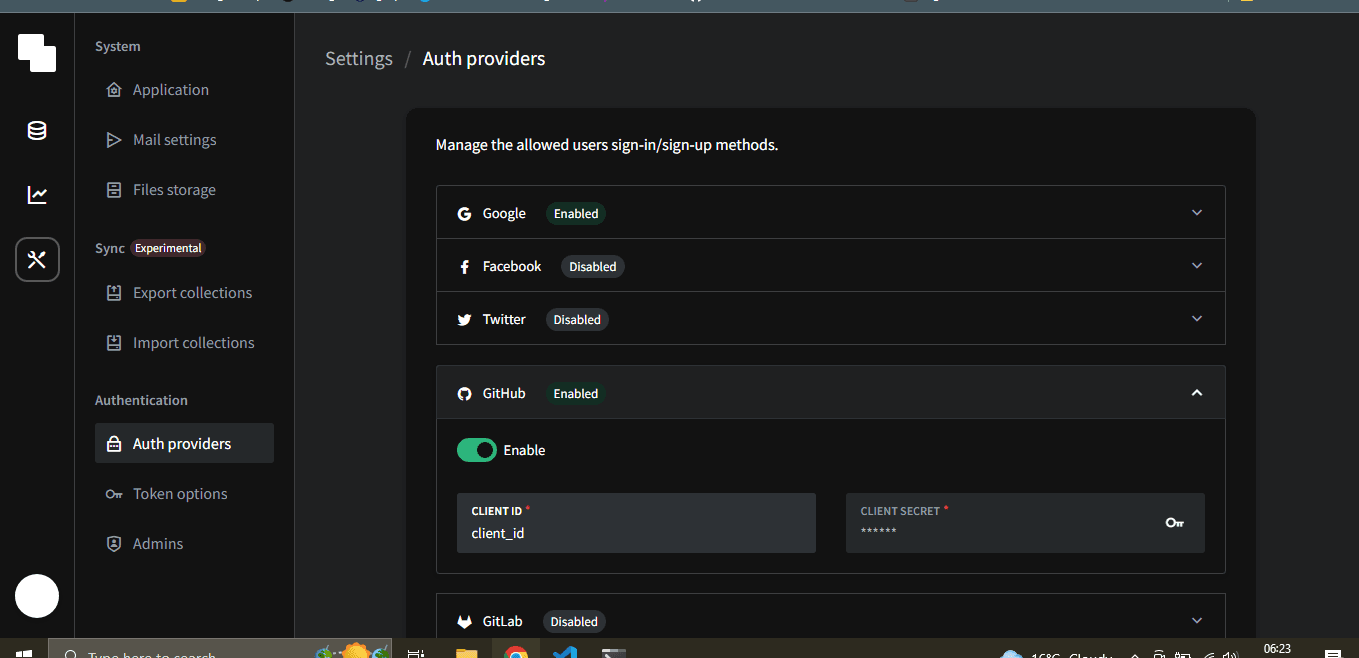
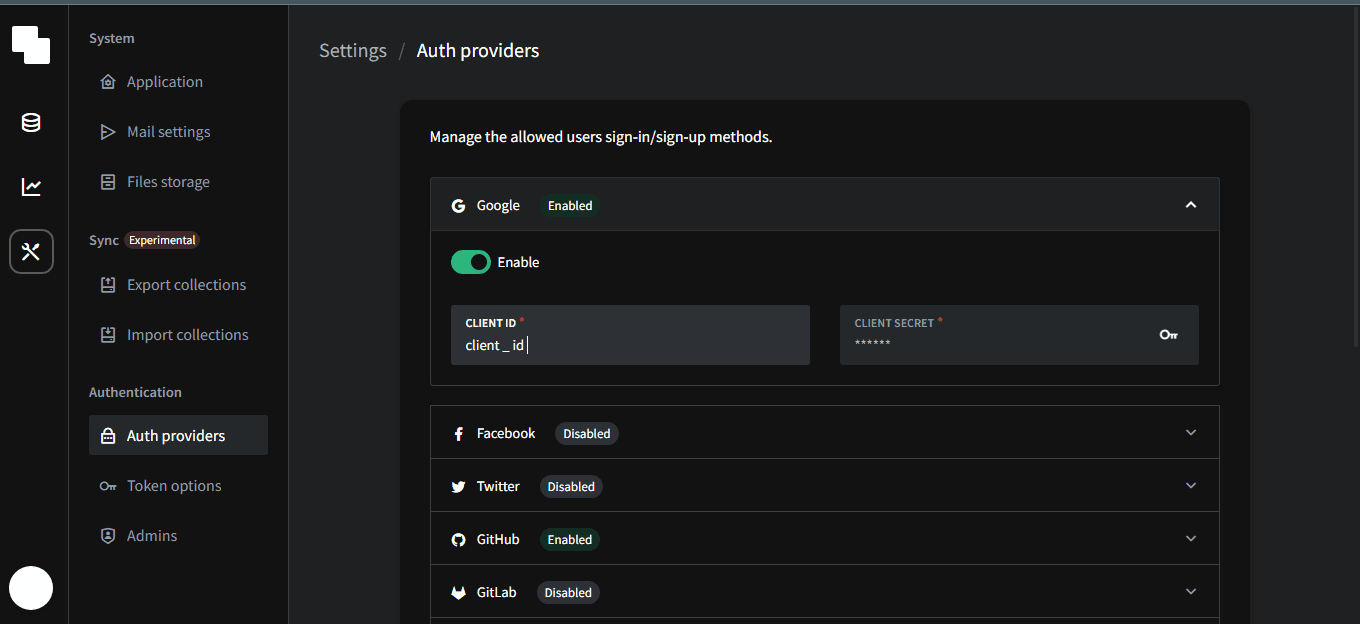
In this first part we'll implement user authentication with the pocketbase social OAUTH providers I'll use google and GitHub but they support a dozen more.
then enable the respective providers in the pocketbase admin dashboard
 
1const authData = await pb.collection('devs').authWithOAuth2(2 'google',3 'CODE',4 'VERIFIER',5 'REDIRECT_URL',6 // optional data that will be used for the new account on OAuth2 sign-up7 {8 'name': 'test',9 },10);1112
to get the required arguments we need to fetch the enabled providers
the start function
first we get some icons for the respective providers
1import { TheIcon } from '@denniskinuthia/tiny-pkgs';2import { FaGithub,FaGoogle } from 'react-icons/fa'34const providerIcons={5github:FaGithub,6google:FaGoogle7}
then
1const providers = await client.collection("devs").listAuthMethods()
initiate login function using:
1const startLogin = (prov:ProvType) => {2 localStorage.setItem("provider",JSON.stringify(prov));3 const redirectUrl = "http://localhost:3000/redirect";4 const url = prov.authUrl + redirectUrl;5 // console.log("prov in button === ", prov)6 // console.log("combined url ==== >>>>>> ",url)78 if (typeof window !== "undefined") {9 window.location.href = url;10 }11 };
then we'll map over them and render out a button for each provider
12 <div className="w-full h-fit md:h-full flex flex-wrap items-center justify-center gap-2 ">34 {provs &&5 provs?.map((item:any) => {6 return (7 <div8 key={item.name}9 onClick={() => startLogin(item)}10 className="p-2 w-[50%] md:w-[30%] cursor-pointer11 bg-slate-600 rounded-lg hover:bg-slate-80012 capitalize text-xl font-bold flex items-center justify-center gap-2"13 >14 <TheIcon15 iconstyle=""16 Icon={providerIcons[item.name as keyof typeof providerIcons]}17 size={'30'}18 />19 {item.name}20 </div>21 );22 })}23 </div>
finally the redirect component
remember to define a route for it in your react router config
<details>
<summary>Click to expand Redirect.tsx</summary>
1Redirect.tsx2345import React, { useEffect } from 'react'6import { useNavigate } from 'react-router-dom';7import { PBUser } from '../../utils/types/types';8import { useQueryClient } from '@tanstack/react-query';9import { client } from './../../utils/pb/config';10import { LoadingRipples } from '@denniskinuthia/tiny-pkgs';11import { redirect_url } from '../../utils/env';12import { login_url } from './../../utils/env';1314interface RedirectProps {15user?:PBUser16}1718export const Redirect: React.FC<RedirectProps> = ({user}) => {19const queryClient = useQueryClient()20const navigate = useNavigate()21const local_prov = JSON.parse(localStorage.getItem('provider') as string)22const url = new URL(window.location.href);23const code = url.searchParams.get('code') as string24const state = url.searchParams.get('state') as string252627// this hasto match what you orovided in the oauth provider , in tis case google28let redirectUrl = redirect_url29useEffect(()=>{30 const pbOauthLogin=async()=>{31 client.autoCancellation(false)32 const oauthRes = await client.collection('devs')33 .authWithOAuth2(local_prov.name, code, local_prov.codeVerifier, redirectUrl)34 await client.collection('devs').update(oauthRes?.record.id as string, {35 avatar: oauthRes.meta?.avatarUrl,36 accessToken: oauthRes.meta?.accessToken37 })38 queryClient.setQueryData(['user'], client.authStore.model)39 navigate('/')4041 }424344 if (local_prov.state !== state) {45 const url = login_url46 if (typeof window !== 'undefined') {47 window.location.href = url;48 }49 }50 else {51 pbOauthLogin().catch((e) => {52 console.log("error logging in with provider == ", e)53 })54 }5556},[])575859606162return (63 <div className='w-full h-full flex items-center justify-center'>64<LoadingRipples/>65</div>66);67}68
</details>
finally we can put in place route AUTH guards , I prefer to do it at the root layout level inside which every other route is nested
<details>
<summary>Click to expand RootLayout.tsx</summary>
1RootLayout.tsx234import React from 'react'5import { Outlet, useNavigate } from 'react-router-dom';6import { Toolbar } from '../../components/toolbar/Toolbar';7import { PBUser } from '../../utils/types/types';891011interface RootLayoutProps {12user : PBUser13test_mode:boolean14}1516export const RootLayout: React.FC<RootLayoutProps> = ({user,test_mode}) => {17 const navigate = useNavigate()18 React.useEffect(() => {19 if (!user?.email&&!test_mode) {20 navigate('/auth')21 }22 }, [user?.email])2324return (25 <div className='w-full h-screen max-h-screen dark:bg-slate-900'>26 <div className='h-14 w-full bg-slate-700 dark:bg-slate-80027 bg-opacity-30 dark:bg-opacity-90 max-h-[50px] p-128 sticky top-0 z-40'>29 <Toolbar user={user} />30 </div>31 <main className=' w-full h-full fixed top-12'>32 <Outlet />33 </main>34 </div>35);36}37
</details>