Back to blogs
Blog
Writing in public
Longer posts — published here first, then cross-posted to Dev.to with a canonical URL back to this site.
Blog
Longer posts — published here first, then cross-posted to Dev.to with a canonical URL back to this site.
Back to blogs
Back to blogs
Postpocketbase, reactquer, react, typescript
pocket base Open Source backend for your next SaaS and Mobile app in 1 file setup...
Date published

slides used in the presentation building the generic component In this example we'll use...

Why You Might Still Pick Next.js Over TanStack Start From a TanStack Start...

A complete theme management system for React applications with SSR support! ✨ 🌟...
Open Source backend for your next SaaS and Mobile app in 1 file
Download for Linux (11MB zip)<br> Download for Windows (11MB zip)<br> Download for macOS x64 (11MB zip)<br> Download for macOS ARM64 (11MB zip)<br>
download a the zipped foledr, exctract it's contents and you'll have a binary execute it in the command line
1./pocketbase serve.
in powershell it would look something like this
1 .\pocketbase.exe serve2
to serve it on your LAN on windows run
1ipconfig
and something lke this in linux
this doesn't work on mac or wsl, but there a lot of other ways
1hostname -I
1.\pocketbase.exe serve --http="192.168.0.101:8090"
once it's up and running ctrl + click on one of the urls in the terminal
1Server started at: http://127.0.0.1:80902 - REST API: http://127.0.0.1:8090/api/3 - Admin UI: http://127.0.0.1:8090/_/
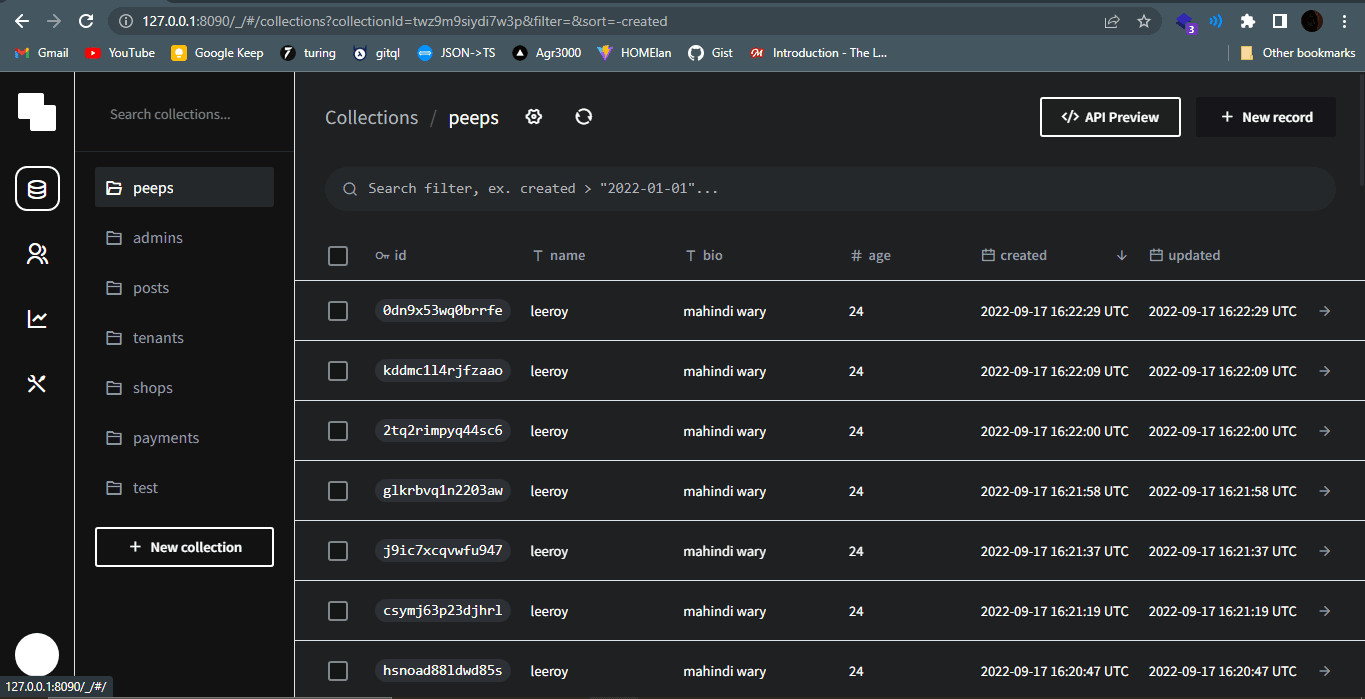
this will be where you do everything from creating and managing new collections , users , viewing logs , changige settings ...

next we deal with the front-edn by using the provided javascript sdk
1npm install pocketbase
then create a config.ts file (optional, you can put all the logic in a component)
1import PocketBase, { Record } from 'pocketbase';2import { QueryClient } from "react-query";345export interface PeepResponse {6 id: string;7 created: string;8 updated: string;9 "@collectionId": string;10 "@collectionName": string;11 age: number;12 bio: string;13 name: string;14 "@expand": {};15}1617// export const client = new PocketBase("http://192.168.43.238:8090");18export const client = new PocketBase("http://127.0.0.1:8090");19export const realTime = async (20 index: [string],21 queryClient: QueryClient,22 ) => {23 return await client.realtime.subscribe("peeps", function (e) {24 console.log("real time peeps", e.record);25 });26};2728export const allPeeps=async():Promise<PeepResponse[]|Record[]>=>{29 return await client.records.getFullList("peeps", 200 /* batch size */, {30 sort: "-created",31 });32}33
in the above example i created a peeps collection and have a function allPeeps that fetches all records from it , the client sdk also has a paginated variaint
we can the use this in out cpmponent with react-query
1const peepsQuery = useQuery(["peeps"], allPeeps);
and map over the data array inside the query
1 peepQuery.data?.map((item)=>{2 return <TheRows list={peepsQuery.data} />3 })4
we can add a new peep by using the sdk too
1 const mutation = useMutation(2({ data, index }: MutationVars) => {3 return client.records.create(index, data);4},5// react-query options , in order to append new peeps by using the data returned after the mutation instaed of having to run the query again to update our list of peeps6// the index will be the react-query index and also the sdk client index7{8//print error if mutation fails9 onError: (err, { data: newData, index }, context) => {10 console.log("error saving the item === ", err)11 },12 //update the list with created record13 onSuccess: (data, { index }) => {14 console.log("vars === ", data, index)15 queryClient.setQueryData(index, (old: any) => {16 old.unshift(data);17 return old;18 });19 console.log("successfull save of item ", data);20 },2122 }23);24
Then we'll use that inside a function that'll be passed to our form's onsubmit prop
1const createPeep = async (data: any) => {2 mutation.mutate({ data, index: "peeps" })3};
the client sdk has support for real time data from collections which we'll wrap it with our function
1export const realTime = async (2 index: [string],3 queryClient: QueryClient,4 ) => {5 // sdk realtime listener6 return await client.realtime.subscribe("peeps", function (e) {7 console.log("real time peeps", e.record);8 appendToCache(index,queryClient,e.record);910 });11};
you can use the data directly , but because we already have react-query managing things we might as well append any new changes to the te existing ['peeps'] query cache
1export const appendToCache=async(index:[string],queryClient:QueryClient,newData:any)=>{2 queryClient.setQueryData(index, (old:any) => {3 old.unshift(newData)4 return old5 });6}
1const queryClient = new QueryClient()
since this will create a new instance on every component render instead use the provided hook
1const queryClient = usQueryClient()
which returns the current instance of the QueryClient
if the function is in an external fie pass it in as a prop. and now calling this inside the app will update the ui automaitcally when any of the data changes
i skipped straight to Oauth providers since the password one looked pretty straight forward
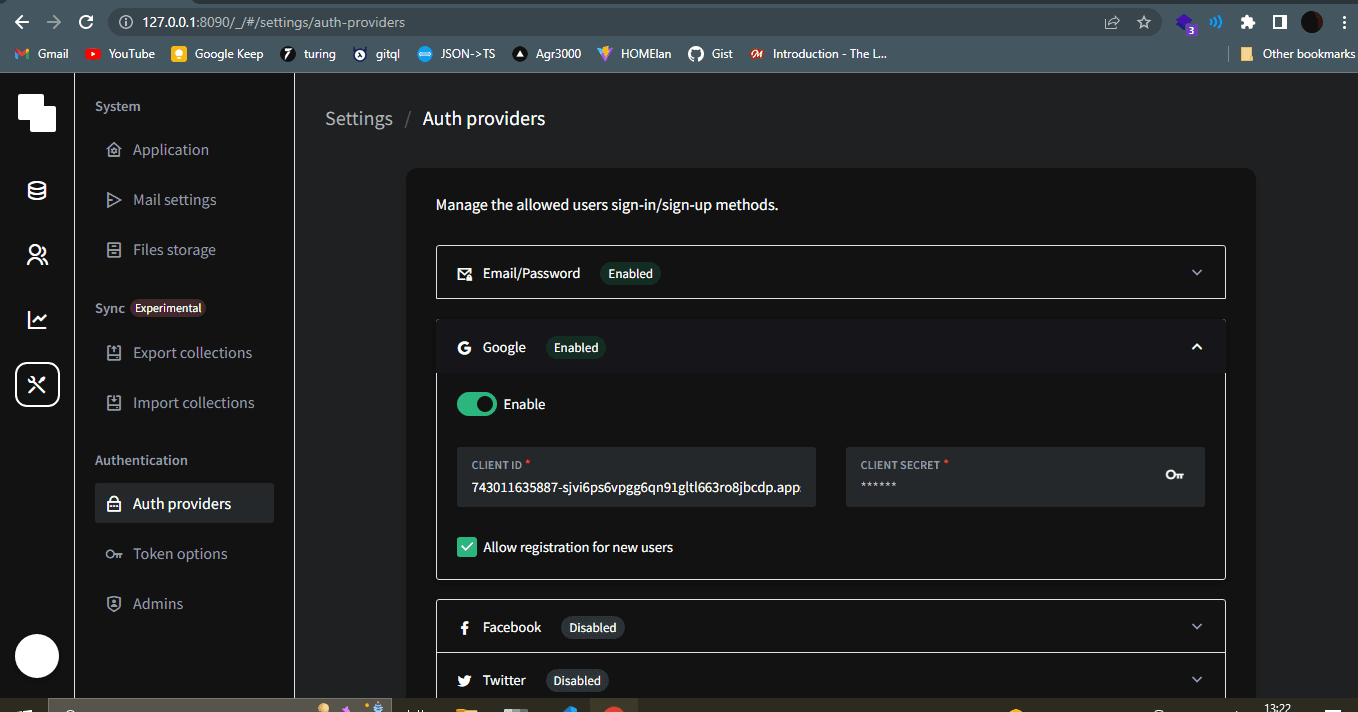
in this case i wanted the google auth because i had already configured a service account for Google Ouath 2 project
you'll need a client id and client secret Google Ouath 2 project
then you'll enable it in the admin dashboard 
>tips , when setting up the service account you'll need allowed javascript origin and a redirectUrl you can use http://localhost:3000 and http://localhost:3000/redirect respectively , this is assuming that's where your react app will be running
after that setup the login page
1import React from 'react'2import { TheButton } from '../Shared/TheButton';3import { client, providers } from './../../pocket/config';456interface LoginProps {78}910export const Login: React.FC<LoginProps> = ({}) => {11let provs = providers.authProviders12 let redirectUrl = 'http://localhost:3000/redirect'1314const startLogin = (prov:any)=>{15localStorage.setItem("provider", JSON.stringify(prov));16 const url = provs[0].authUrl + redirectUrl17 if (typeof window !== 'undefined') {18 window.location.href = url;19 }20}2122232425return (26 <div className='w-full h-full flex-col-center'>27 <div className='text-3xl font-bold '>LOGIN</div>28 {29 provs&&provs?.map((item,index)=>{30 return (31 <TheButton32 key={item.name}33 label={item.name}34 border={'1px solid'}35 padding={'2%'}36 textSize={'1.2 rem'}37 onClick={()=>startLogin(item)}38 />39 )40 })41 }42 </div>43);44}45
and the redirect page as so
1import React from 'react'2import { useSearchParams,useNavigate,Navigate } from 'react-router-dom';3import { client } from './../../pocket/config';4import { useQueryClient } from 'react-query';5import { UserType } from './types';678interface RedirectProps {9user?: UserType | null10}1112export const Redirect: React.FC<RedirectProps> = ({ user }) => {13 //@ts-ignore14 const local_prov = JSON.parse(localStorage.getItem('provider'))15 const [searchParams] = useSearchParams();16 const code = searchParams.get('code') as string17 // compare the redirect's state param and the stored provider's one18 const queryClient= useQueryClient()19 let redirectUrl = 'http://localhost:3000/redirect'20 const [loading,setLoading]= React.useState(true)21 if (local_prov.state !== searchParams.get("state")) {22 let url = 'http://localhost:3000/login'23 if (typeof window !== 'undefined') {24 window.location.href = url;25 }26 } else {27 client.users.authViaOAuth2(28 local_prov.name,29 code,30 local_prov.codeVerifier,31 redirectUrl)32 .then((response) => {33 console.log("authentication data === ", response)34 client.records.update('profiles', response.user.profile?.id as string, {35 name:response.meta.name,36 avatarUrl:response.meta.avatarUrl37 }).then((res)=>{38 console.log(" successfully updated profi;e",res)39 }).catch((e) => {40 console.log("error updating profile == ", e)41 })42 setLoading(false)43 console.log("client modal after logg == ",client.authStore.model)44 queryClient.setQueryData(['user'], client.authStore.model)4546 }).catch((e) => {47 console.log("error logging in with provider == ", e)48 })49 }50 if(user){51 return <Navigate to="/" replace />;52 }5354 return (55 <div>56 {57 loading?(58 <div className='w-full h-full flex-center'>loading .... </div>) :59 (60 <div className='w-full h-full flex-center'>success</div>6162 )}63 </div>64 );65}6667686970
this also assumes that you're using react-router-dom v6
1import './App.css'2import { useTheme } from './utils/hooks/themeHook'3import { BsSunFill, BsFillMoonFill } from "react-icons/bs";;4import { TheIcon } from './components/Shared/TheIcon';56import { Query, useQuery } from 'react-query';7import { BrowserRouter, Routes, Route } from 'react-router-dom';8import { Home } from './components/home/Home';9import { Redirect } from './components/login/Redirect';10import { Login } from './components/login/Login';11import { useEffect, useInsertionEffect } from 'react';12import { client } from './pocket/config';13import { ProtectedRoute } from './components/login/PrivateRoutes';14import { UserType } from './components/login/types';151617type AppProps = {18 // queryClient:QueryClient19};20type MutationVars = {21 data: any;22 index: string;23}24export interface FormOptions {25 field_name: string;26 field_type: string;27 default_value: string | number28 options?: { name: string; value: string }[]29}30function App({ }: AppProps) {31 const { colorTheme, setTheme } = useTheme();32 const mode = colorTheme === "light" ? BsSunFill : BsFillMoonFill;33 const toggle = () => {34 setTheme(colorTheme);35 };3637 const getUser = async()=>{38 return client.authStore.model39 }4041424344 const userQuery = useQuery(["user"],getUser);4546 console.log("user query ====== ",userQuery)474849if(userQuery.isLoading){50 return(51 <div className="w-full min-h-screen text-5xl font-bold flex-col-center">52 LOADING....53 </div>54 )55}56 if (userQuery.isError) {57 return (58 <div className="w-full min-h-screen text-5xl font-bold flex-col-center">59 {/* @ts-ignore */}60 {userQuery?.error?.message}61 </div>62 )63 }64const user = userQuery.data as UserType|null|undefined65 return (66 <div67 className="w-full min-h-screen flex-col-center scroll-bar68 dark:bg-black dark:text-white "69 >7071 <BrowserRouter>72 <div className="fixed top-[0px] w-[100%] z-50">73 <div className="w-fit p-1 flex-center">74 <TheIcon Icon={mode} size={"25"} color={""} iconAction={toggle} />75 </div>76 </div>77 <div className="w-full h-[90%] mt-16 ">78 <Routes>79 <Route80 path="/"81 element={82 <ProtectedRoute user={user}>83 <Home user={user} />84 </ProtectedRoute>85 }86 />87 {/* @ts-ignore */}88 <Route path="/login" element={<Login />} />8990 <Route path="/redirect" element={<Redirect user={user}/>} />9192 </Routes>93 </div>94 </BrowserRouter>9596 </div>97 );98}99100export default App
*and that's it . i plan to port over an exsting app to pocketbase and write about all the quirky things one might run into<br> for the complete code github repo<br>
pardon the messy code i was more focused on getting it to work and putting the word out there hopefully you'll make your way around this awesome tool much easier*